Short-term rentals
Free Airbnb Turnover Checklist
Reset a short-term rental consistently between guests with practical cleaning, supply, inspection, and guest-ready tasks in one reusable turnover checklist.
Get the interactive, shareable version
Open this checklist in ClickUp to assign owners, track progress, and share it with your cleaner or co-host.


Prefer paper? Download the printable checklist
Keep a clean, checkbox-ready PDF for walkthroughs and cleaner handoffs.
A rushed turnover can lead to missed cleaning, missing supplies, guest complaints, and poor reviews. This workflow puts every inspection, reset, and handoff step in one repeatable order.
What’s included
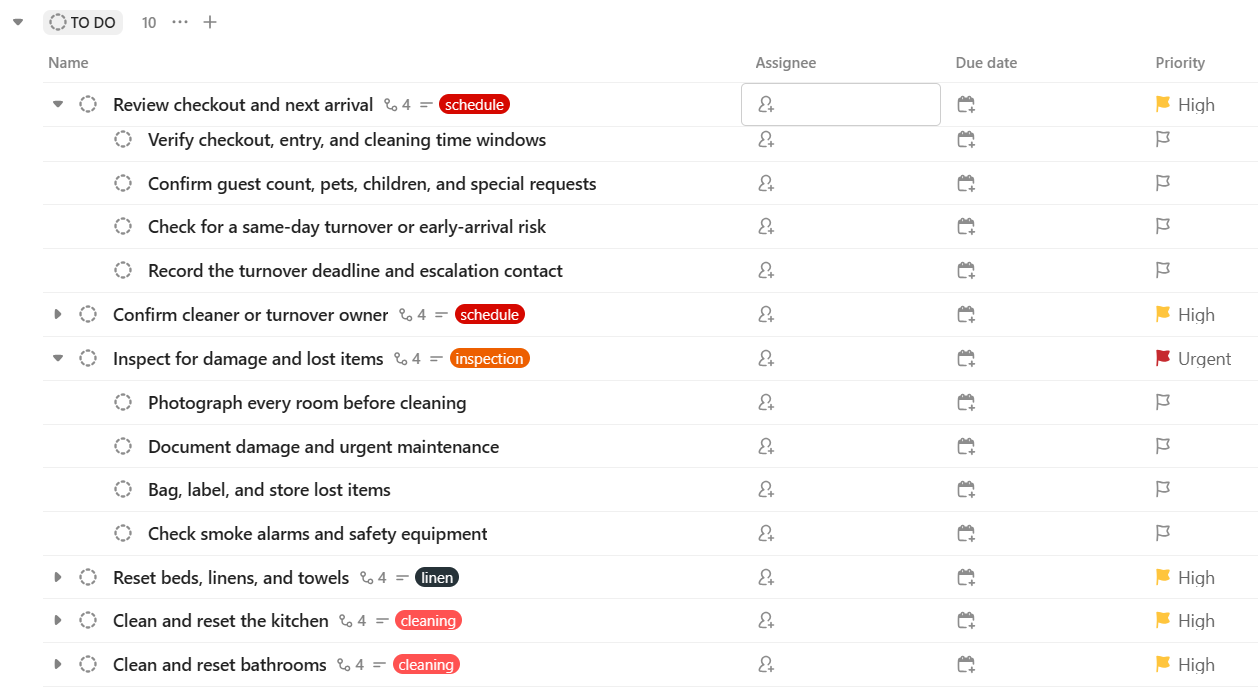
Review checkout and next arrival: Confirm checkout time, the next guest arrival time, guest count, and special requests.
Confirm cleaner or turnover owner: Assign the turnover and confirm the time the property will be entered.
Inspect for damage and lost items: Walk every room, photograph damage, and secure any item left by the departing guest.
Reset beds, linens, and towels: Strip used linen, make every bed, and place the correct number of fresh towels.
Clean and reset the kitchen: Wash dishes, clean appliances and surfaces, empty food, and reset the kitchen inventory.
Clean and reset bathrooms: Sanitize bathroom surfaces, replace consumables, and check drainage and water pressure.
Restock guest essentials: Replenish paper goods, soap, coffee, tea, and the essentials promised in the listing.
Test amenities and access: Check Wi-Fi, lights, heating or cooling, remote controls, locks, and the key or smart-lock code.
Complete final quality check: Take ready-to-arrive photos, check smells and temperature, and confirm every room is guest-ready.
Send the ready-for-arrival message: Confirm the property is ready and send the guest their arrival instructions at the planned time.
Run a reliable turnover
Plan the turnover time window
Start with the departure and arrival times, then work backwards from the promised check-in time. A same-day change needs an owner, an entry time, and a clear deadline before anyone starts cleaning. If the cleaner cannot finish in time, decide early whether to bring in help, adjust the arrival plan, or block the date. Put special requests, pets, extra guests, and early check-in notes in the first task so they are not discovered halfway through the reset.
Use photos and notes to protect the property
Photograph each room before cleaning when a guest leaves. This creates a simple record of existing damage, missing items, and the condition of safety equipment. Label and store forgotten belongings rather than leaving them in the property for the next guest. After the quality check, take a small set of ready-to-arrive photos. They make it easier to resolve a complaint fairly and help a remote host verify that the listing standard was met.
Make the cleaner handoff repeatable
Give one person ownership of the turnover, even when several people clean or inspect the property. The owner should confirm access, share guest notes, mark problems as waiting, and only send the arrival message when the final check is complete. Keep supply shortages and maintenance issues visible instead of hiding them in a chat message. Over time, update the checklist with property-specific items such as a hot tub, grill, local safety checks, or a welcome basket.
Use this free workflow in ClickUp
Use the link below to open this template. Create a free ClickUp account if needed, then import and customize the workflow for your project.
Open the free ClickUp templateDisclosure: This page contains an affiliate link. We may earn a commission if you sign up through it, at no extra cost to you.
Preview the interactive template
Frequently asked questions
- Is this Airbnb turnover checklist free?
- Yes. The workflow is designed to work with a free ClickUp account and can be adapted for one property or a portfolio.
- Can I share this with my cleaner?
- Yes. After importing, invite a cleaner or co-host to the List and assign the tasks they own for each turnover.
- Can I customize the supplies and inspections?
- Yes. Add the exact linens, amenities, local safety checks, and guest instructions that apply to your property.